> For the complete documentation index, see [llms.txt](https://docs.konvu.com/konvu/llms.txt). Markdown versions of documentation pages are available by appending `.md` to page URLs; this page is available as [Markdown](https://docs.konvu.com/konvu/triage-and-remediation/monitor-and-deliver/notifications/slack-daily-digest.md).

# Slack Daily Digest

Connect Slack to Konvu and get a daily digest of the dependencies newly confirmed exploitable in your codebase.

Connect Slack to receive Konvu notifications in a channel of your choice. The integration powers the **daily exploitable digest**: a once-a-day message listing the dependencies Konvu newly confirmed exploitable in the last 24 hours, so your team sees them without opening the app.

The digest covers SCA (open-source dependency) findings only. It does not include SAST or container findings.

## Connect Slack

The Slack integration is configured per organization in Konvu and connects through Slack's standard app-install flow. You don't paste a webhook URL or a bot token.

1. Go to **Integrations** in Konvu and click the **Slack** card.
2. Click **Connect to Slack**. A new tab opens to authorize the Konvu app.
3. In Slack, review the requested permissions and choose the workspace to install into, then approve. The tab closes and the Slack integration opens on its detail panel.
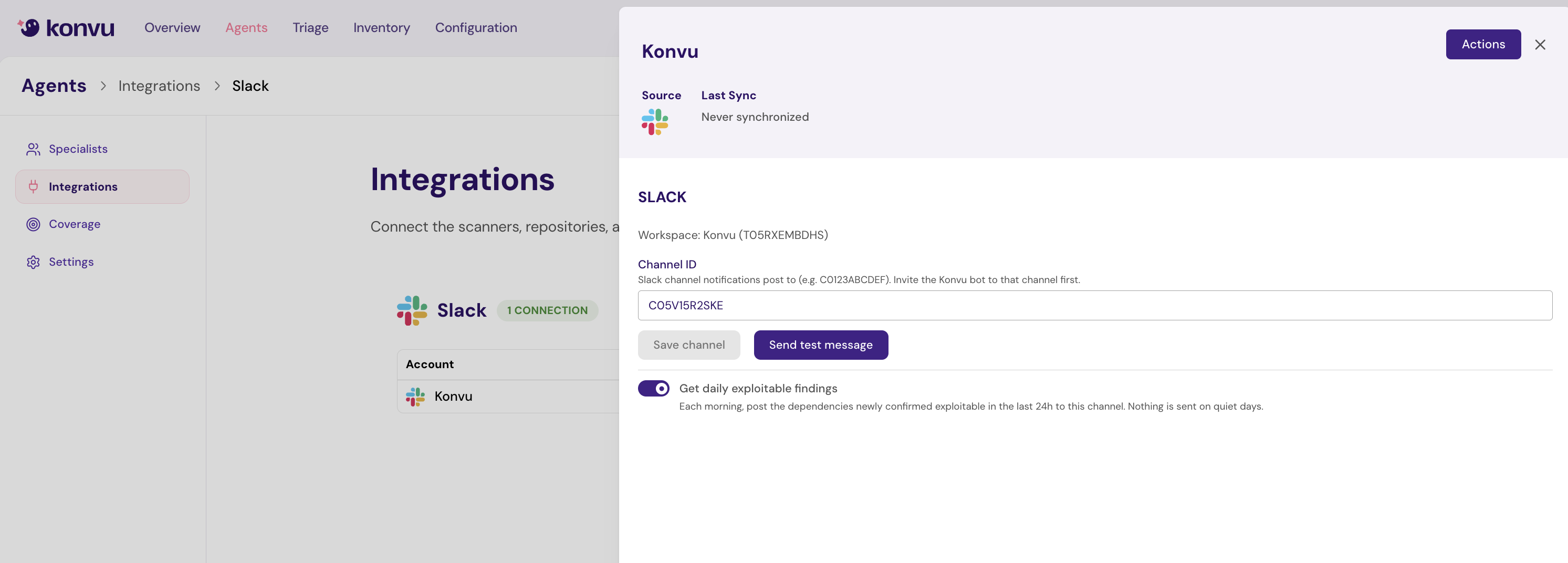
4. Enter the **Channel ID** of the channel Konvu should post to (for example, `C0123ABCDEF`), then click **Save channel**.
5. Invite the Konvu bot to that channel in Slack (`/invite @Konvu`). Konvu can only post to a channel its bot has joined.
6. Click **Send test message** to confirm delivery. A test message in the channel means Konvu is connected and can reach it.

{% hint style="info" %}
To find a channel's ID in Slack, open the channel, click its name in the header, and copy the **Channel ID** shown at the bottom of the details panel.
{% endhint %}

<figure><img src="https://4216786002-files.gitbook.io/~/files/v0/b/gitbook-x-prod.appspot.com/o/spaces%2Fd2uS6kuROSFKDrT5HC1U%2Fuploads%2Fgit-blob-e742591298d660691071d4c263ae5654f4e51ed7%2Fslack-integration-panel.png?alt=media" alt=""><figcaption><p>Set the channel ID, send a test message, and turn on the daily digest from the Slack panel</p></figcaption></figure>

## Turn on the daily exploitable digest

Once a channel is saved and reachable, enable the digest from the same Slack panel:

1. In **Integrations**, open the Slack integration.
2. Turn on **Get daily exploitable findings**.

You can also use the **Slack** switch on the **Daily exploitable recap** row in **Organization Settings > Notifications**. It stays disabled until Slack is connected.

When you enable it, Konvu posts a confirmation message to the channel before switching the digest on. This is a deliverability check: if Konvu can't post (for example, the channel doesn't exist or the bot isn't in it), the toggle stays off and the error is shown inline so the digest never silently fails to reach a channel Konvu can't deliver to.

The digest is set per organization and posts to the channel saved on that Slack integration.

## What the digest contains

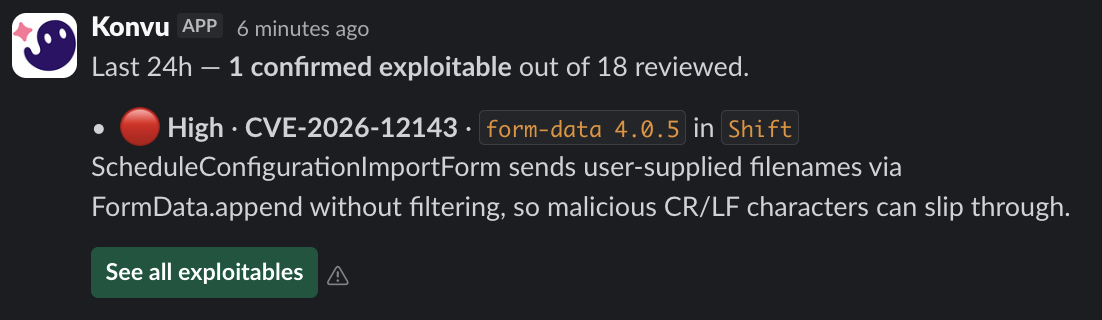
Each morning at **11:00 AM Eastern Time**, Konvu posts one message summarizing the findings whose assessment changed to exploitable in the previous 24 hours. It opens with how many findings were **confirmed exploitable** out of how many Konvu **reviewed** (received a completed assessment) in that window, then details each finding:

* **Severity**: shown with a colored marker (critical, high, medium, low)
* **CVE / GHSA**: links straight to the finding in Konvu
* **Affected package**: name and version
* **Repository**: where the dependency was found
* **Summary**: a short, reachability-grounded explanation of why it's exploitable in your code

<figure><img src="https://4216786002-files.gitbook.io/~/files/v0/b/gitbook-x-prod.appspot.com/o/spaces%2Fd2uS6kuROSFKDrT5HC1U%2Fuploads%2Fgit-blob-63ac617f0f650c40be637ed5442a6376e68a9140%2Fslack-daily-exploitable-message.png?alt=media" alt=""><figcaption><p>A digest with one newly confirmed exploitable finding out of 18 reviewed</p></figcaption></figure>

A representative message with several findings:

```
🔔 3 dependencies newly confirmed exploitable in the last 24h

🔴 CVE-2024-21626 · runc 1.1.11 · payments-api
   Reachable via the container runtime path used by your build jobs.

🔴 CVE-2025-25193 · netty 4.1.108 · gateway
   Exploitable through BoundedInputStream.read() on the request handler.

🟡 CVE-2024-37890 · ws 8.16.0 · web-frontend
   Triggered by unbounded header parsing on the public WebSocket endpoint.

View all in Konvu →
```

When a day has many new findings, Konvu details the most important ones and summarizes the rest in a closing line; critical findings are always listed in full and never rolled into the summary.

On a **quiet day**, with no dependency newly confirmed exploitable in the last 24 hours, Konvu sends nothing.

{% hint style="info" %}
The daily exploitable digest is separate from the weekly posture digest. You can run either or both.
{% endhint %}

## Scope and limits

* The digest covers **SCA findings only**. SAST and container findings are not included.
* It reports findings on assessed repositories' default branches, using a 24-hour lookback.
* Each Slack integration posts to **one channel**. To deliver to more than one channel, save the channel you want before enabling the digest.
* Konvu retries transient delivery failures. If Slack reports the app's access was revoked, the integration is disabled and you'll need to reconnect it.

## Troubleshooting

* **No test message arrived**: confirm the **Channel ID** is correct and that the Konvu bot has been invited to the channel.
* **The toggle won't turn on**: the deliverability check failed. Re-check the channel exists and the bot is a member, then try again.
* **The digest stopped arriving**: check that the Slack integration still shows as connected in **Integrations**; if access was revoked in Slack, reconnect with **Connect to Slack**. Remember that quiet days send nothing, so a gap may mean no new exploitable findings.

## Next steps

* [Triage findings](/konvu/triage-and-remediation/exploitability-assessment.md) to review the assessments behind each digest entry.
* [Weekly Email Digest](/konvu/triage-and-remediation/monitor-and-deliver/notifications/weekly-email-digest.md) for a weekly summary by email.
* [Notifications](/konvu/triage-and-remediation/monitor-and-deliver/notifications.md) for every notification Konvu sends.


---

# Agent Instructions
This documentation is published with GitBook. GitBook is the documentation platform designed so that both humans and AI agents can read, navigate, and reason over technical content effectively. Learn more at gitbook.com.

## Querying This Documentation
If you need additional information that is not directly available in this page, you can query the documentation by asking a question.

Perform an HTTP GET request on the following URL with the `ask` and `goal` query parameters:

```
GET https://docs.konvu.com/konvu/triage-and-remediation/monitor-and-deliver/notifications/slack-daily-digest.md?ask=<question>&goal=<user_goal>
```

`ask` is the immediate question: it should be specific, self-contained, and written in natural language.
`goal` is what the user is ultimately trying to achieve, the reason they need the answer. Sharing it helps GitBook give you a better, more relevant answer. A goal is most helpful when it describes the outcome the user wants rather than restating the question. For example, with `ask=how do I create an API token`, a goal like `automate deployments from our CI pipeline` lets GitBook tailor the answer to that use case.

The response will contain a direct answer to the question and relevant excerpts and sources from the documentation.

Use this mechanism when the answer is not explicitly present in the current page, you need clarification or additional context, or you want to retrieve related documentation sections.