> For the complete documentation index, see [llms.txt](https://docs.konvu.com/konvu/llms.txt). Markdown versions of documentation pages are available by appending `.md` to page URLs; this page is available as [Markdown](https://docs.konvu.com/konvu/triage-and-remediation/monitor-and-deliver/inventory/threat-profiles.md).
# Threat Profiles
How Konvu profiles each repository: exposure, access, blast radius, stakes, attackers, and runtime, scored into a tier that drives prioritization.
Konvu builds a threat profile for every repository it analyzes. The profile answers what the codebase is, where it is exposed, what it holds, and who could realistically reach it. It produces a 0-100 score, a named tier (Crown Jewel, Key Asset, Standard, Peripheral), and an evidence-bearing breakdown across six dimensions.
The tier is how Konvu ranks repositories against each other. The same CVE in an internet-exposed service holding customer data and in an internal one-off script is not the same finding, and the threat profile is what separates them.
## Where to find it
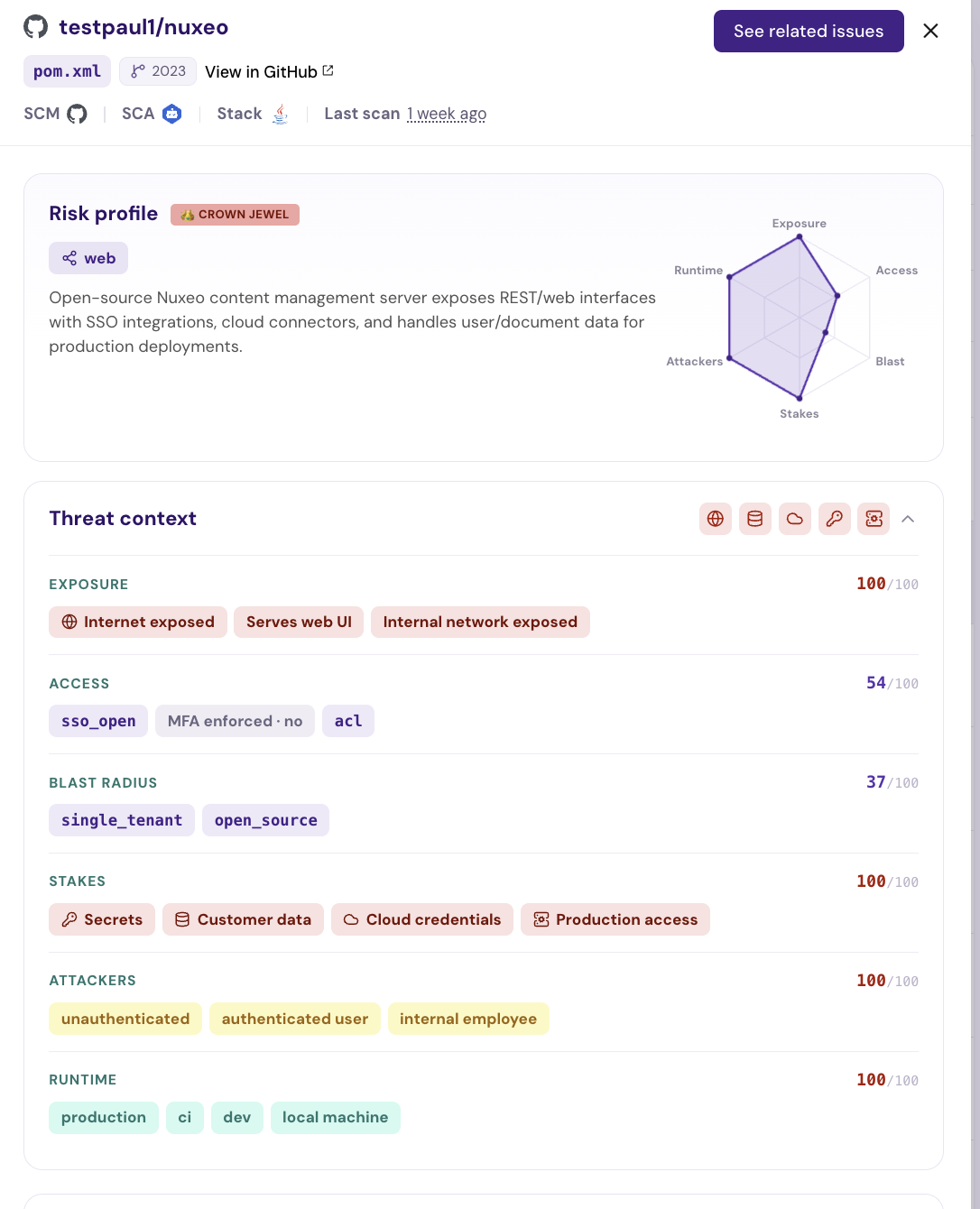
Open the [Inventory](/konvu/triage-and-remediation/monitor-and-deliver/inventory.md) page. The Threat Profile column carries each repository's tier and the rationale behind it. Click a repository to open its drawer, where the profile shows as two blocks:
* **Risk profile**: the tier, the component type, exposed domains, a one-line summary, and a radar of the six dimensions.
* **Threat context**: the per-dimension breakdown, each with its own 0-100 score and the attributes Konvu detected.
Clicking a vertex on the radar jumps to that dimension in Threat context. The top of the Inventory page also shows the org-wide rollup: how many repositories fall in each tier, and how many are internet exposed, handle customer data, or hold cloud credentials.
The Risk profile and Threat context blocks in the Inventory repository drawer
## The six dimensions
| Dimension | What it captures | Attributes |
| ---------------- | ----------------------------------------------------- | -------------------------------------------------------------------------------------------------------------------------------------------------------------- |
| **Exposure** | How reachable the deployed system is | Internet exposed, Serves web UI, Internal network exposed |
| **Access** | How callers authenticate and what they can do once in | Auth mechanism (`none`, `basic_auth`, `api_key`, `sso_open`, `oauth`, `sso_org_restricted`), MFA enforced, Authorization model (`none`, `acl`, `rbac`, `abac`) |
| **Blast Radius** | How far a compromise spreads beyond one deployment | Tenancy (`single_tenant`, `multi_tenant`), Distribution (`internal_only`, `open_source`, `ships_to_customers`) |
| **Stakes** | What an attacker gets on success | Secrets, Customer data, Cloud credentials, Production access |
| **Attackers** | Who can realistically reach and abuse the surface | `unauthenticated`, `authenticated_user`, `internal_employee` |
| **Runtime** | Where the code runs | `production`, `ci`, `dev`, `local_machine` |
Weaker values raise the score: confirmed missing authentication scores higher than SSO restricted to your domain, and `multi_tenant` scores higher than `single_tenant`. Enforced MFA works the other way and dampens the Access contribution.
Two attributes are informational and never move the score:
* **Surface**: the primary kind of surface the repo presents (`web`, `api`, `cli`, `library`, `job`, `infrastructure`).
* **Domains**: the public hosts the repository is served at.
Infrastructure repositories (IaC, CI/CD, deploy tooling) are scored differently. Attributes that describe the deployed system, not the repo itself, are excluded, then the repo is floored by how much production control it actually holds (detected secrets, cloud credentials, production access).
## Tiers
| Tier | Score | What it means |
| ------------------ | ------ | ------------------------------------------------------------------------------------------------------------------------------- |
| 👑 **Crown Jewel** | 80-100 | Live production asset with a severe surface: exposed, holding secrets or customer data, reachable by unauthenticated attackers. |
| **Key Asset** | 60-79 | Real asset with a narrower surface or lower stakes. |
| **Standard** | 40-59 | Ordinary internal code. |
| **Peripheral** | 0-39 | Demos, fixtures, templates, dormant repositories. |
Crown Jewel is reserved for production. A non-production repository caps at Key Asset no matter how severe its surface, so the top tier always means a live production crown jewel.
Repositories that look like non-assets (demo, sample, fixture, playground, template, archived, and similar) are discounted, scaled by how confident the classification is.
## Evidence and provenance
Every attribute carries its provenance, a confidence value, and the evidence Konvu cited:
* **Detected**: grounded in a concrete signal read from the repository, such as a route directory, a Terraform file, or a statement in the README. Counts fully toward the score.
* **Guessed**: inferred from repository metadata alone (name, description, languages). Capped at half weight and scaled by confidence, so a guess alone cannot push a repository into a high tier.
Hover an attribute in Threat context to see its evidence.
A profile where nothing scoring-relevant was detected rests entirely on guesses. Konvu still shows it, but flags it as low evidence and does not let it override the criticality already assigned to that repository.
## How profiles are built
Konvu reads the repository over the GitHub or GitLab API. There is no clone. It collects the file tree, README, languages, topics, and manifest files, compacts them into bounded evidence (large monorepos are sampled, not read whole), and classifies each attribute against that evidence.
Repositories with no commit activity for over a year are marked Peripheral without a full analysis. This is based on positive evidence of staleness only: a repository whose last activity is unknown always goes through full profiling.
A repository is profiled when you enable assessment on it, and a daily sweep picks up any eligible repository that still has no profile. A profile is not rebuilt on every push.
## What the tier changes
* **Finding prioritization**: the score feeds the criticality Konvu attaches to each manifest in the repository, which ranks findings across your backlog.
* **Remediation scope**: on the Remediate page, the repository scope selector can restrict remediation plans to **Key Asset & above** instead of **All repos**. Within a scope, plans are ranked by tier, so Crown Jewel repositories are worked first.
## Limitations
* The profile is read-only. You cannot edit an attribute or rewrite a tier from the dashboard.
* Grounding requires Konvu to read your source. A repository connected only through a scanner import or CSV, with no SCM integration, is profiled from metadata and is flagged as low evidence.
* Konvu infers attributes from code and repository structure. It does not scan your production infrastructure, network traffic, datastores, or IAM policies, so "Customer data" means the codebase handles customer data, not that a specific database was inspected.
* Self-hosted GitHub and GitLab repositories are read by the on-prem controller rather than the Konvu API, so profiles depend on that deployment being connected. See [Self-Hosted Analysis](/konvu/get-started/connect-your-environment/source-code/self-hosted-analysis.md).
## From the CLI
```bash
# Org-wide rollup: tier distribution and the top repos by score
konvu inventory
# The full profile for one repository, with every attribute and its evidence
konvu inventory show org/repo
# Machine-readable, scoped to the fields you need
konvu inventory show org/repo -o json --fields threat_profile_score,threat_profile_tier
```
Pipe the ranked list into another command with `--quiet`, which prints `repo_idtier`:
```bash
konvu inventory --quiet | grep crown_jewel
```
## Related
* [Dashboard & Overview](/konvu/triage-and-remediation/monitor-and-deliver/dashboard-and-overview.md): org-wide posture metrics, assessment progress, and top CVEs.
* [Triage List View](/konvu/triage-and-remediation/triage/triage-list-view.md): filter and sort findings, which are ranked using repository criticality.
* [How Assessments Work](/konvu/triage-and-remediation/exploitability-assessment/how-assessments-work.md): how Konvu decides whether a finding is exploitable.
---
# Agent Instructions
This documentation is published with GitBook. GitBook is the documentation platform designed so that both humans and AI agents can read, navigate, and reason over technical content effectively. Learn more at gitbook.com.
## Querying This Documentation
If you need additional information that is not directly available in this page, you can query the documentation by asking a question.
Perform an HTTP GET request on the following URL with the `ask` and `goal` query parameters:
```
GET https://docs.konvu.com/konvu/triage-and-remediation/monitor-and-deliver/inventory/threat-profiles.md?ask=&goal=
```
`ask` is the immediate question: it should be specific, self-contained, and written in natural language.
`goal` is what the user is ultimately trying to achieve, the reason they need the answer. Sharing it helps GitBook give you a better, more relevant answer. A goal is most helpful when it describes the outcome the user wants rather than restating the question. For example, with `ask=how do I create an API token`, a goal like `automate deployments from our CI pipeline` lets GitBook tailor the answer to that use case.
The response will contain a direct answer to the question and relevant excerpts and sources from the documentation.
Use this mechanism when the answer is not explicitly present in the current page, you need clarification or additional context, or you want to retrieve related documentation sections.