> For the complete documentation index, see [llms.txt](https://docs.konvu.com/konvu/llms.txt). Markdown versions of documentation pages are available by appending `.md` to page URLs; this page is available as [Markdown](https://docs.konvu.com/konvu/triage-and-remediation/finding-types/secrets.md).

# Secrets

Review a secret finding, understand its assessment evidence, and decide what to do next.

Open a secret finding to see whether the credential works, what access it could grant, and how an attacker could obtain it. Each assessment includes supporting evidence to help you decide what needs remediation.

{% hint style="info" %}
Before triaging, [connect your source code](/konvu/get-started/connect-your-environment/source-code.md) and [enable secret scanning](/konvu/administration/assessment-settings.md#secret-scanning).
{% endhint %}

## Open a finding

1. Go to **Triage > Secrets > Konvu detections**.
2. Filter by repository, provider, validity, impact, or exposure. Use **High impact** and **Exposed** to focus your review.
3. Open a row to view its assessment details.

Konvu groups occurrences of the same credential and provider within your organization. A finding can include several files, repositories, and commits, so you can review the credential and its affected locations together.

The **GitHub alerts** tab shows imported GitHub Secret Scanning alerts separately. Follow an alert's source link to review it in GitHub; an imported alert alone is not a Konvu impact or exposure assessment.

## Reading the assessment details

The detail panel answers three questions. Read each assessment, then inspect its **Supporting evidence**.

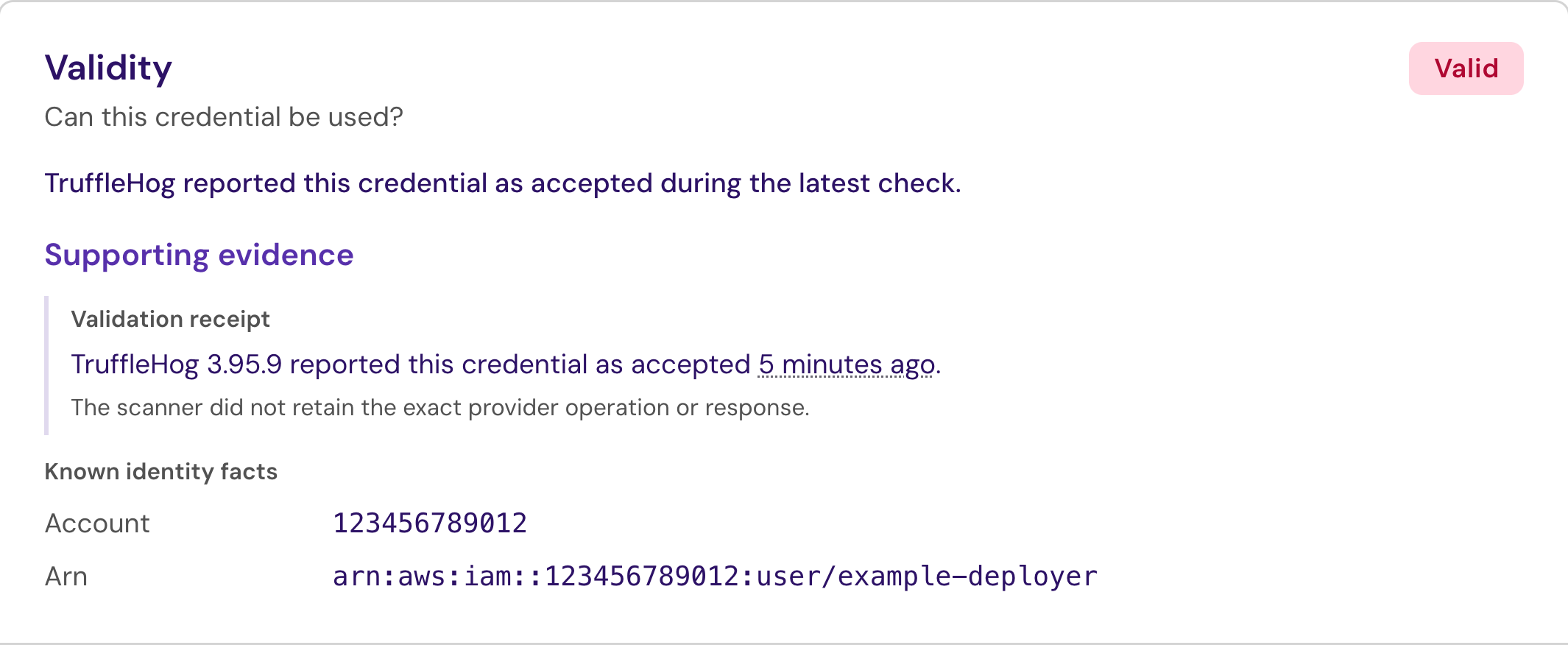
### 1. Validity

Can this credential be used?

| Result      | What it means                                                                                          |
| ----------- | ------------------------------------------------------------------------------------------------------ |
| **Valid**   | The credential is assessed as usable. Check the validation receipt for the latest automated check.     |
| **Invalid** | The credential was ruled invalid or the finding was marked false positive. Read the supporting reason. |
| **Unknown** | The available checks have not settled whether the credential works.                                    |

The validation receipt shows available verifier details and the check time. A cached result reflects an earlier check. Known identity facts help identify the account or principal involved; acceptance alone does not establish all its permissions.

<figure><img src="https://4216786002-files.gitbook.io/~/files/v0/b/gitbook-x-prod.appspot.com/o/spaces%2Fd2uS6kuROSFKDrT5HC1U%2Fuploads%2Fgit-blob-d98468853158a4d5d1d487d7886a73b2bb5a8b5c%2FSecrets%20validity.png?alt=media" alt="Validity section showing a simulated accepted credential, a validation receipt, and a fictional AWS identity."><figcaption><p>Check the validation time and identity facts. This fictional example shows a simulated acceptance result; no provider request was made.</p></figcaption></figure>

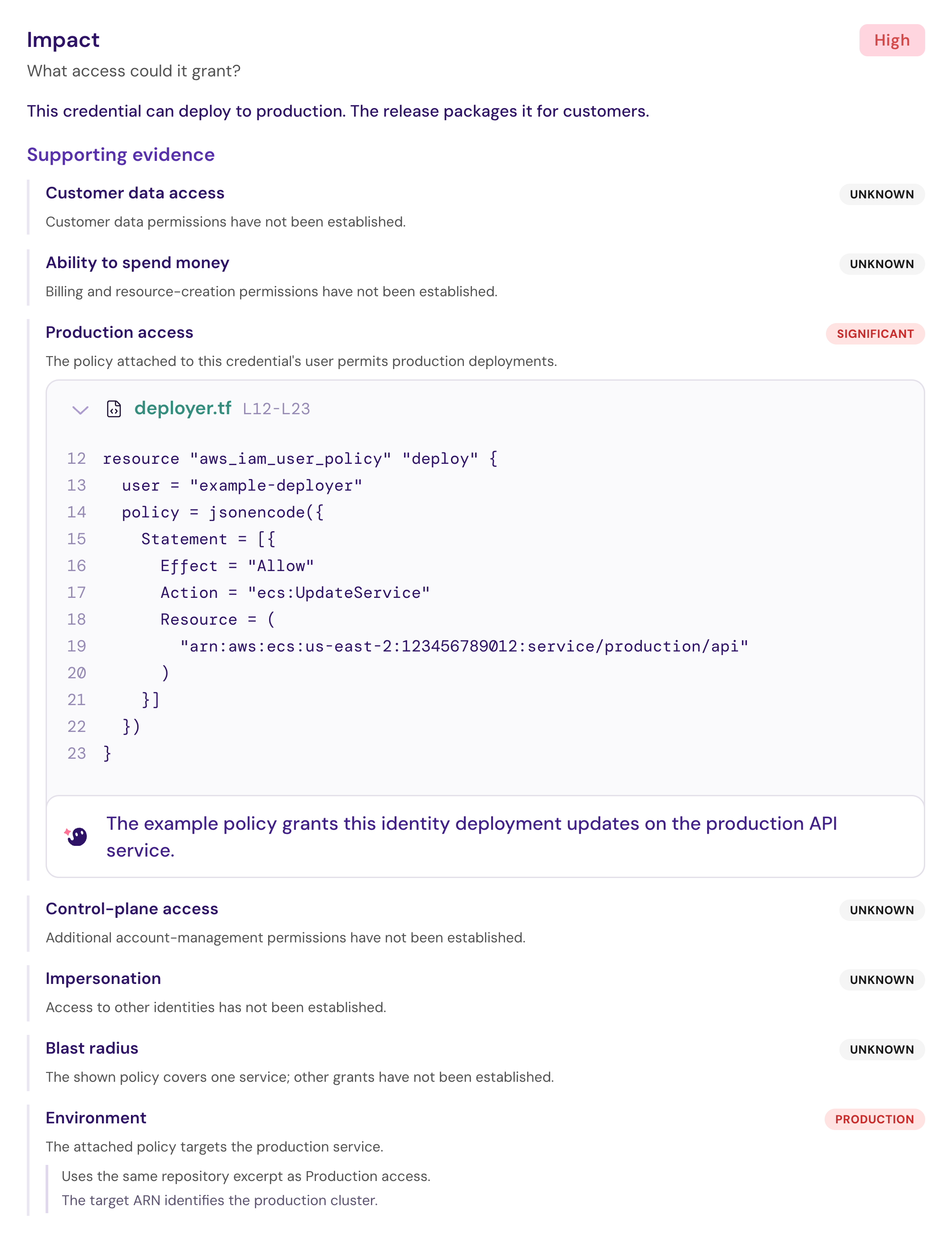
### 2. Impact

What access could it grant?

Konvu assesses customer data access, spending capability, production access, control-plane access, impersonation, and blast radius. The panel shows an impact level of **High**, **Medium**, or **Low**, along with the evidence behind individual capabilities.

Expand the proofs to inspect the code and reasoning. A capability marked **Unknown** has not been established. **Not established** means the assessment did not establish an impact level; **Not assessed** means no impact assessment is available.

<figure><img src="https://4216786002-files.gitbook.io/~/files/v0/b/gitbook-x-prod.appspot.com/o/spaces%2Fd2uS6kuROSFKDrT5HC1U%2Fuploads%2Fgit-blob-f9152e3561c0f84fb79eba4c1dbb26c66096f1ed%2FSecrets%20impact.png?alt=media" alt="Impact section showing a production deployment policy as supporting evidence, with other capabilities marked Unknown."><figcaption><p>Review the proof for each capability. In this fictional example, a policy grants production deployment access while other permissions remain unknown.</p></figcaption></figure>

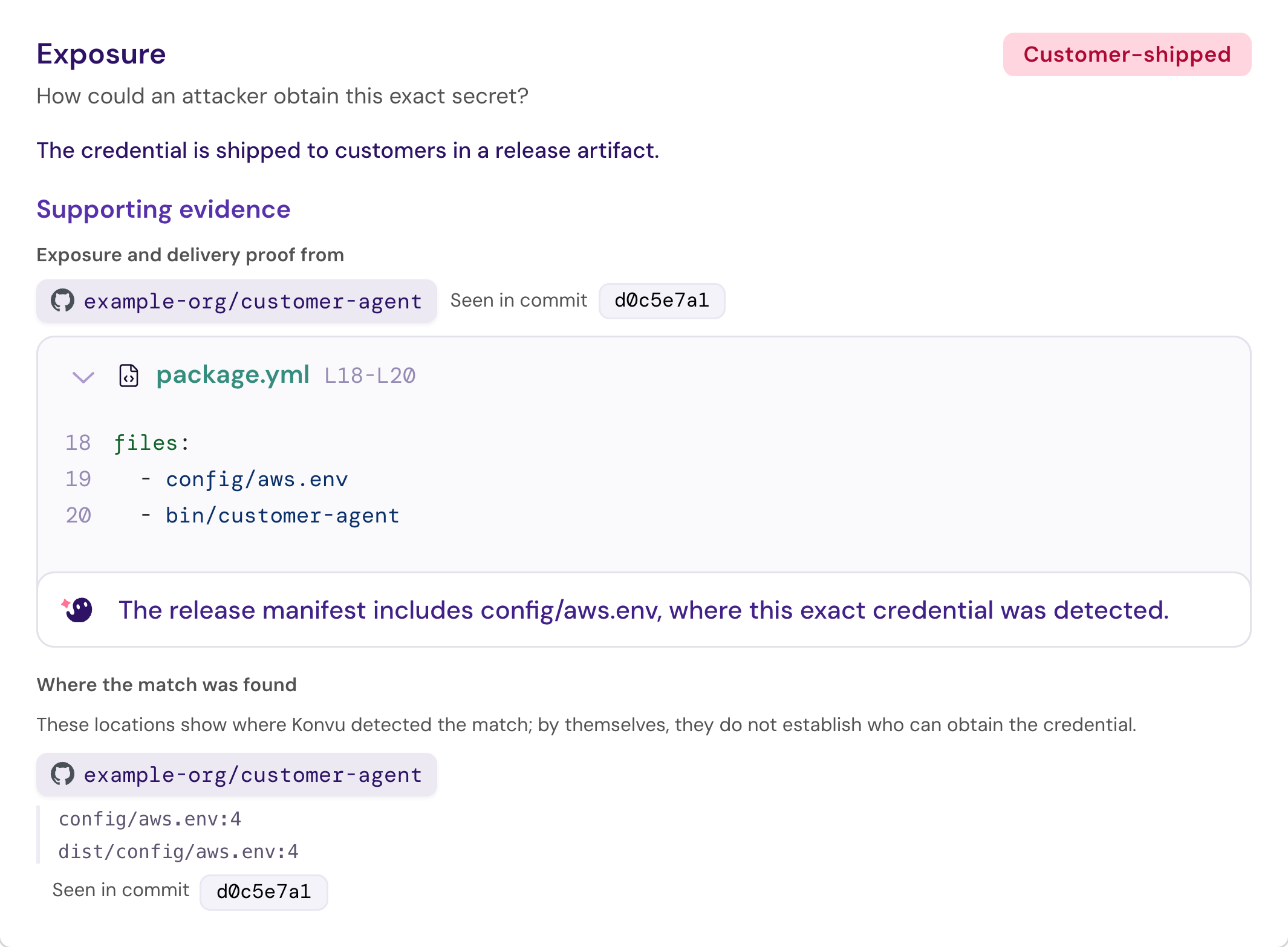
### 3. Exposure

How could an attacker obtain this exact secret?

Exposure evidence can identify a **Public repository**, a **Client bundle**, a **Customer-shipped** artifact, or an endpoint that makes the credential available. **Restricted** means evidence establishes restriction to the organization. **Not established** means exposure remains unresolved; it does not prove containment.

Check the repository and commit attached to the delivery proof. **Where the match was found** lists detected locations, which may differ from the source of the exposure evidence.

*Example: A credential in a private repository can still be exposed if the release packages its configuration file for customers.*

<figure><img src="https://4216786002-files.gitbook.io/~/files/v0/b/gitbook-x-prod.appspot.com/o/spaces%2Fd2uS6kuROSFKDrT5HC1U%2Fuploads%2Fgit-blob-deb6976b4b13940c189fdb60785b4ea4c32b7201%2FSecrets%20exposure.png?alt=media" alt="Exposure section showing a customer-shipped credential, release-manifest evidence, and two grouped file locations."><figcaption><p>Follow the delivery proof to its repository and commit. This fictional release includes the credential-bearing file; the detected locations are shown separately.</p></figcaption></figure>

## Acting on the result

For a credential that needs remediation, revoke or rotate it with its provider, update dependent applications, and remove it from affected files and distributed artifacts. For supported providers, **Go to provider** opens the provider console. Konvu does not automatically revoke the credential.

Removing a value from the latest commit does not invalidate the credential or remove earlier copies. Follow your organization's incident process when exposure warrants investigation.

If the match is a false positive, select its row and choose **Mark false positive**. You can select multiple groups. This updates all occurrences of each selected credential in Konvu; it does not dismiss alerts in an external scanner.

## When to investigate further

* **Validity is Unknown:** Check the receipt and your [provider-validation policy](/konvu/administration/assessment-settings.md#provider-validation). A disabled or inconclusive check does not mean the credential is invalid.
* **Impact or exposure is incomplete:** Review the available proofs and their source locations. Findings ruled invalid skip these assessments.
* **No findings or assessments:** Clear filters, check [repository coverage](/konvu/administration/assessment-settings.md#secret-scanning), and verify that analysis has run. For waiting assessments, check the [Secrets credit balance](/konvu/administration/assessment-credits.md#secrets-credits).

## Next steps

* [Assessment Settings](/konvu/administration/assessment-settings.md#secret-scanning): Adjust repository coverage and provider validation.
* [Secrets data handling](/konvu/reference/data-collection-and-security.md#secrets-data-handling): Understand masked findings and outbound validation.


---

# Agent Instructions
This documentation is published with GitBook. GitBook is the documentation platform designed so that both humans and AI agents can read, navigate, and reason over technical content effectively. Learn more at gitbook.com.

## Querying This Documentation
If you need additional information that is not directly available in this page, you can query the documentation by asking a question.

Perform an HTTP GET request on the following URL with the `ask` and `goal` query parameters:

```
GET https://docs.konvu.com/konvu/triage-and-remediation/finding-types/secrets.md?ask=<question>&goal=<user_goal>
```

`ask` is the immediate question: it should be specific, self-contained, and written in natural language.
`goal` is what the user is ultimately trying to achieve, the reason they need the answer. Sharing it helps GitBook give you a better, more relevant answer. A goal is most helpful when it describes the outcome the user wants rather than restating the question. For example, with `ask=how do I create an API token`, a goal like `automate deployments from our CI pipeline` lets GitBook tailor the answer to that use case.

The response will contain a direct answer to the question and relevant excerpts and sources from the documentation.

Use this mechanism when the answer is not explicitly present in the current page, you need clarification or additional context, or you want to retrieve related documentation sections.