> For the complete documentation index, see [llms.txt](https://docs.konvu.com/konvu/llms.txt). Markdown versions of documentation pages are available by appending `.md` to page URLs; this page is available as [Markdown](https://docs.konvu.com/konvu/get-started/bring-in-findings/container-and-cloud-scanners/wiz.md).
# Wiz
Add a source-code exploitability layer to your Wiz container findings, and optionally forward Konvu's assessments back to Wiz.
Wiz tells you what's exposed. The Wiz integration adds a source-code exploitability layer on top: Konvu imports your container vulnerability findings from Wiz, then analyzes your application code to confirm whether each vulnerable code path is actually exploitable in your codebase. What's left is a short, confirmed set of findings your developers can act on. Konvu pulls container findings only; it does not import Wiz's SCA, host, or Kubernetes findings.
Optionally, Konvu can also forward its exploitability assessments back to Wiz. When you turn this on, every finding Konvu confirms exploitable in your environment gets a `Konvu: Exploitable` note directly on the matching Wiz finding, so the results are visible without leaving Wiz. See [Forward exploitability assessments back to Wiz](#forward-assessments-to-wiz-optional).
## What this integration brings in
For each container finding:
* Vulnerability identifier (CVE)
* Affected package name and version
* Severity (critical, high, medium, low)
* The repository / image the finding came from
* Observed date
Konvu runs an initial backfill of your current container findings, then keeps them up to date with scheduled incremental syncs (daily by default). Wiz finding status carries over on each sync: findings you resolve or reject in Wiz flip to fixed or dismissed in Konvu.
{% hint style="info" %}
The Wiz integration is configured at the company level. Each integration maps to one Wiz tenant. Konvu pulls all container-scoped findings from that tenant, with no per-project filtering.
{% endhint %}
## Prerequisites
* A Wiz tenant with container vulnerability data
* Permission in Wiz to create a service account
## Setup steps
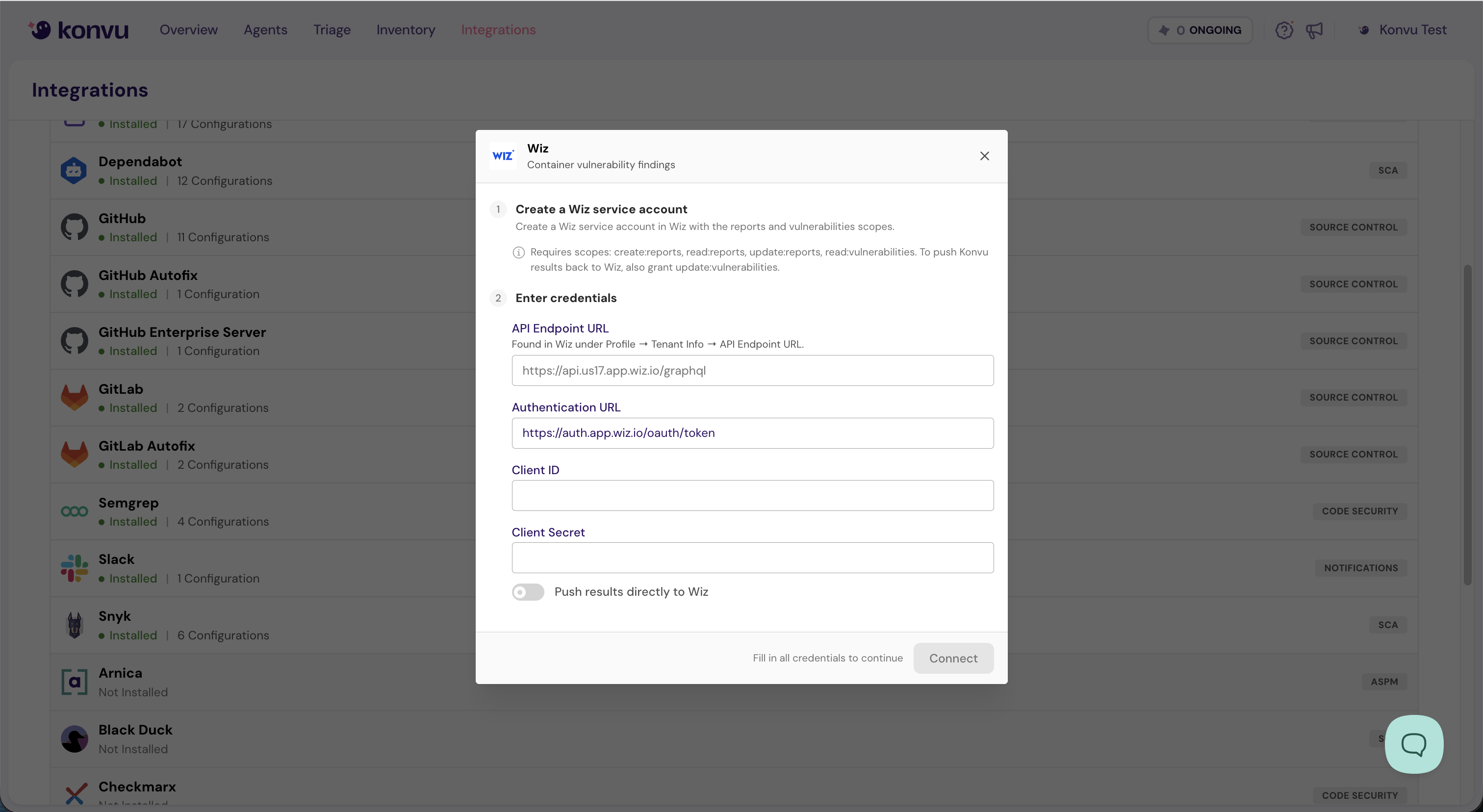
1. **Create a Wiz service account.** In Wiz, create a **read-only** service account with the reports and vulnerabilities scopes. Konvu needs: `create:reports`, `read:reports`, `update:reports`, and `read:vulnerabilities`.
2. Navigate to [**Integrations**](https://app.konvu.com/configuration/integrations) in Konvu and click **Connect Wiz**.
3. **Enter credentials:**
* **API endpoint**: your Wiz GraphQL endpoint, found in Wiz under **Profile → Tenant Info → API Endpoint URL** (for example, `https://api.us17.app.wiz.io/graphql`)
* **OAuth token URL**: the Wiz token endpoint (defaults to `https://auth.app.wiz.io/oauth/token`)
* **Client ID**: from your Wiz service account
* **Client secret**: from your Wiz service account
4. Click **Connect**. Konvu authenticates with the service account and runs a read check against your container findings before saving. If it can't connect, you'll see an error; verify the client ID, secret, API endpoint, and token URL.
Enter your Wiz service account credentials, choose whether to push results back, then click Connect
{% hint style="warning" %}
Each Wiz tenant can be connected once. If you try to connect a service account that's already in use, Konvu rejects it as a duplicate.
{% endhint %}
## Verify findings are flowing
After connecting, Konvu runs the initial backfill. To confirm:
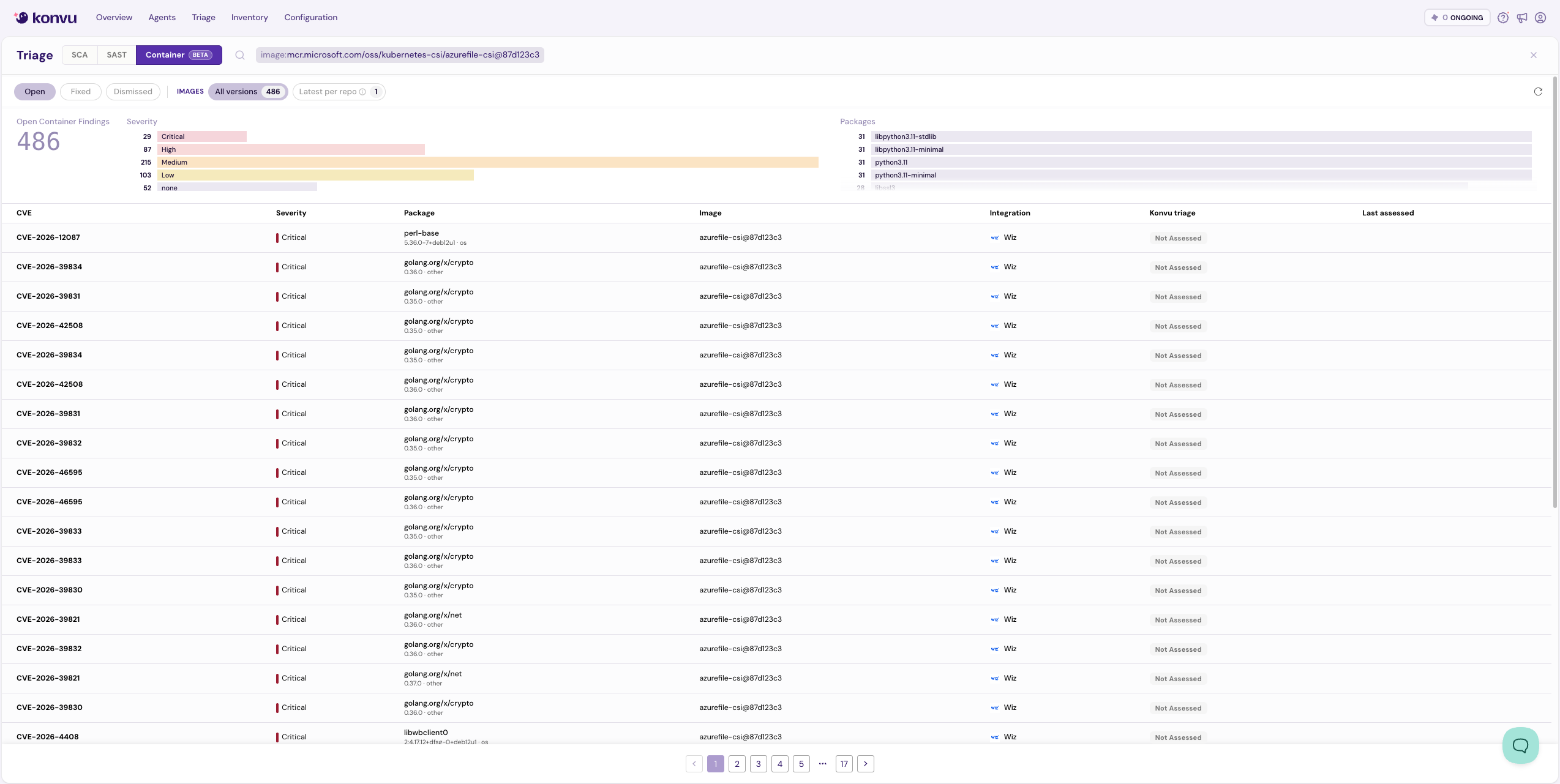
1. Go to **Integrations** in Konvu and open the Wiz integration. The detail drawer shows your **Container repositories**, **Container images**, and **Wiz findings** counts.
2. Navigate to the **Triage** page. Your Wiz container findings should appear there.
Wiz container findings in the Triage view
If the sync shows an error, verify that the service account is still active, has the required scopes, and that the tenant has container vulnerability findings.
## Forward assessments to Wiz (optional)
Konvu can forward its assessments to your Wiz findings, so the triage it does in your environment shows up in Wiz too. When you enable this, every container finding Konvu confirms exploitable gets an informational `Konvu: Exploitable` note set on the matching Wiz vulnerability finding.
Konvu only ever sets that note. It does not change the finding's status or severity, and a re-sync overwrites the same note rather than adding duplicates. Only findings Konvu confirms exploitable in your environment are annotated; everything else is left untouched. Two more guardrails: findings you've resolved or rejected in Wiz since the last sync are skipped, never re-opened, and findings carrying a note you wrote yourself are skipped too, so your own notes are never overwritten.
To turn it on:
1. Give the Wiz service account write access to update vulnerability findings (the `update:vulnerabilities` scope), in addition to the read scopes above.
2. When connecting Wiz, or when editing an existing integration, enable **Push results directly to Wiz**. You can also turn it on or off from the Wiz row in **Organization Settings > Data Forwarding**, where deliveries appear under **Delivery activity**. See [Data Forwarding](/konvu/triage-and-remediation/monitor-and-deliver/data-forwarding.md).
Konvu forwards the assessments at the end of each sync, on the same schedule as the import. Leave the toggle off to keep the integration read-only.
## Next steps
* [Triage findings](/konvu/triage-and-remediation/exploitability-assessment.md) to review Konvu's assessments on your container findings
* [AWS Inspector](/konvu/get-started/bring-in-findings/container-and-cloud-scanners/aws-inspector.md): bring in container findings from AWS Inspector and Amazon ECR
---
# Agent Instructions
This documentation is published with GitBook. GitBook is the documentation platform designed so that both humans and AI agents can read, navigate, and reason over technical content effectively. Learn more at gitbook.com.
## Querying This Documentation
If you need additional information that is not directly available in this page, you can query the documentation by asking a question.
Perform an HTTP GET request on the following URL with the `ask` and `goal` query parameters:
```
GET https://docs.konvu.com/konvu/get-started/bring-in-findings/container-and-cloud-scanners/wiz.md?ask=&goal=
```
`ask` is the immediate question: it should be specific, self-contained, and written in natural language.
`goal` is what the user is ultimately trying to achieve, the reason they need the answer. Sharing it helps GitBook give you a better, more relevant answer. A goal is most helpful when it describes the outcome the user wants rather than restating the question. For example, with `ask=how do I create an API token`, a goal like `automate deployments from our CI pipeline` lets GitBook tailor the answer to that use case.
The response will contain a direct answer to the question and relevant excerpts and sources from the documentation.
Use this mechanism when the answer is not explicitly present in the current page, you need clarification or additional context, or you want to retrieve related documentation sections.