> For the complete documentation index, see [llms.txt](https://docs.konvu.com/konvu/llms.txt). Markdown versions of documentation pages are available by appending `.md` to page URLs; this page is available as [Markdown](https://docs.konvu.com/konvu/get-started/bring-in-findings/armorcode.md).

# ArmorCode

Import SCA findings from ArmorCode, send individual SCA assessments, and automatically forward SCA and SAST assessments as comments and tags.

Connect ArmorCode to import open-source dependency vulnerabilities into Konvu and send exploitability assessments back to the matching ArmorCode findings. You can review Konvu's assessment and supporting explanation in ArmorCode alongside your existing triage workflow.

ArmorCode imports **SCA findings** into Konvu. You can send an individual SCA assessment from Triage or automatically forward completed **SCA and SAST assessments** to matching findings in ArmorCode. SAST findings must already be available in Konvu through a supported scanner connection; this integration does not import them from ArmorCode. Secrets, container, and infrastructure-as-code assessments are not forwarded to ArmorCode.

{% hint style="info" %}
You can configure one ArmorCode connection per Konvu organization. Automatic delivery is **off by default**. Connecting starts the SCA import. To send results back, enable automatic forwarding or explicitly send an individual SCA assessment.
{% endhint %}

## Prerequisites

* An ArmorCode account with the findings you want to import or update: SCA findings for import, and matching SCA or SAST findings for forwarding.
* An ArmorCode API key with findings read access. To send assessments back, the key also needs access to add comments and update finding tags in bulk.
* [Source code connected to Konvu](/konvu/get-started/connect-your-environment/source-code.md) so Konvu can map findings to your repositories and assess exploitability.

For SCA import, ArmorCode findings must identify the repository, affected package name and version, a supported manifest or lockfile path, and a vulnerability identifier. Konvu reads structured CVE identifiers, with a GHSA identifier fallback from finding text. Findings with missing required metadata or an unrecognized package ecosystem are skipped.

## Steps to integrate ArmorCode with Konvu

1. Create an API key in ArmorCode with the access described above.
2. Open **Integrations** in Konvu and select **ArmorCode**.
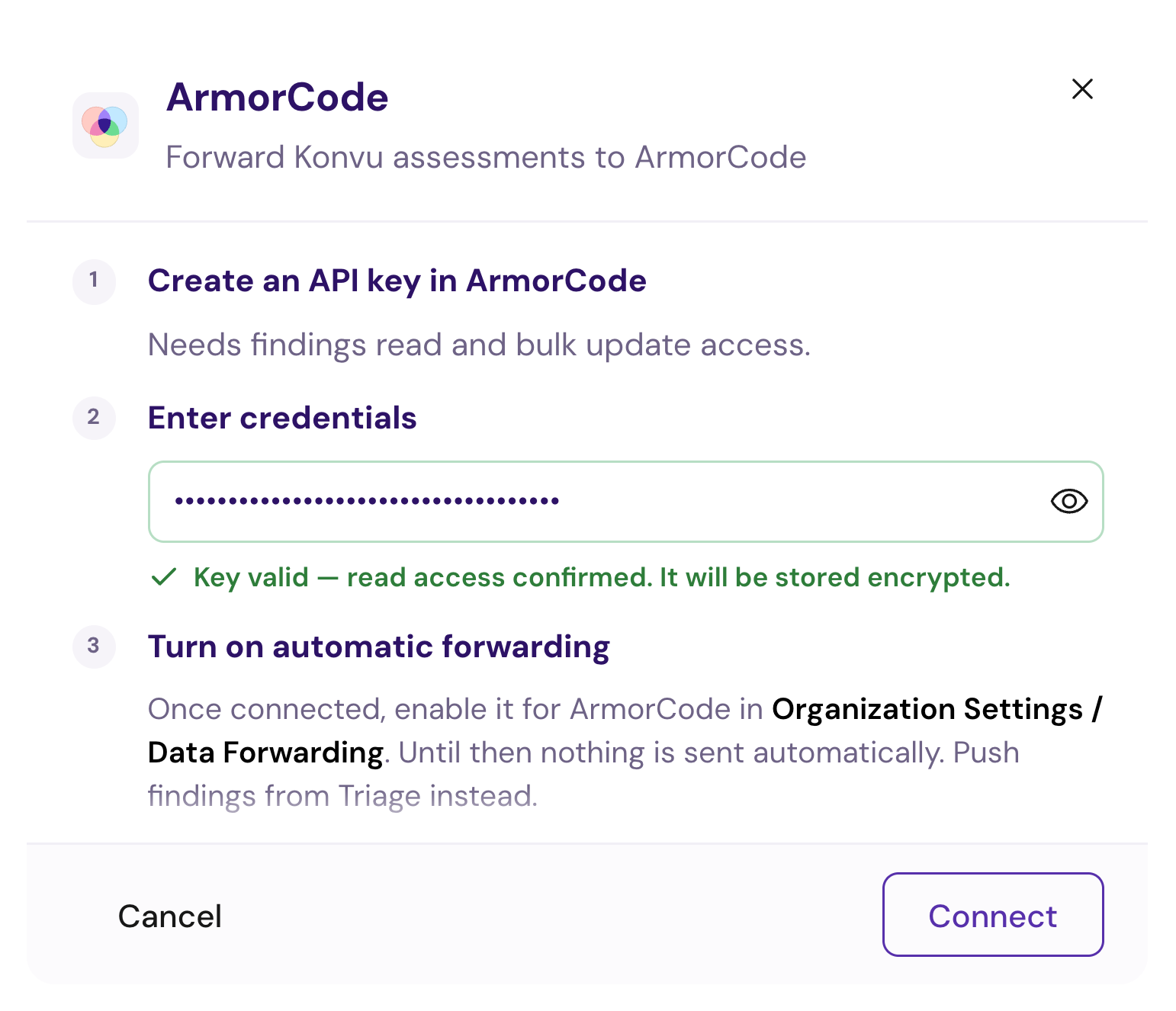
3. Paste the key into **API key**. Konvu checks it with a read-only findings request. Wait for **Key valid — read access confirmed**.
4. Click **Connect**. Konvu validates the key again, stores it encrypted, and starts the first import.

<figure><img src="https://4216786002-files.gitbook.io/~/files/v0/b/gitbook-x-prod.appspot.com/o/spaces%2Fd2uS6kuROSFKDrT5HC1U%2Fuploads%2Fgit-blob-be5682e0aae6a07f2a61239caa9da87ac6e403a3%2FArmorCode%20setup.png?alt=media" alt="ArmorCode setup dialog with a masked, validated API key and instructions to enable forwarding after connecting" width="490"><figcaption><p>Validate your API key, then click Connect. Enable automatic forwarding separately in Data Forwarding.</p></figcaption></figure>

{% hint style="info" %}
Key validation confirms read access only. It does not test comment or tag writes, so successful validation does not guarantee that automatic delivery has the permissions it needs.
{% endhint %}

## Verify the connection

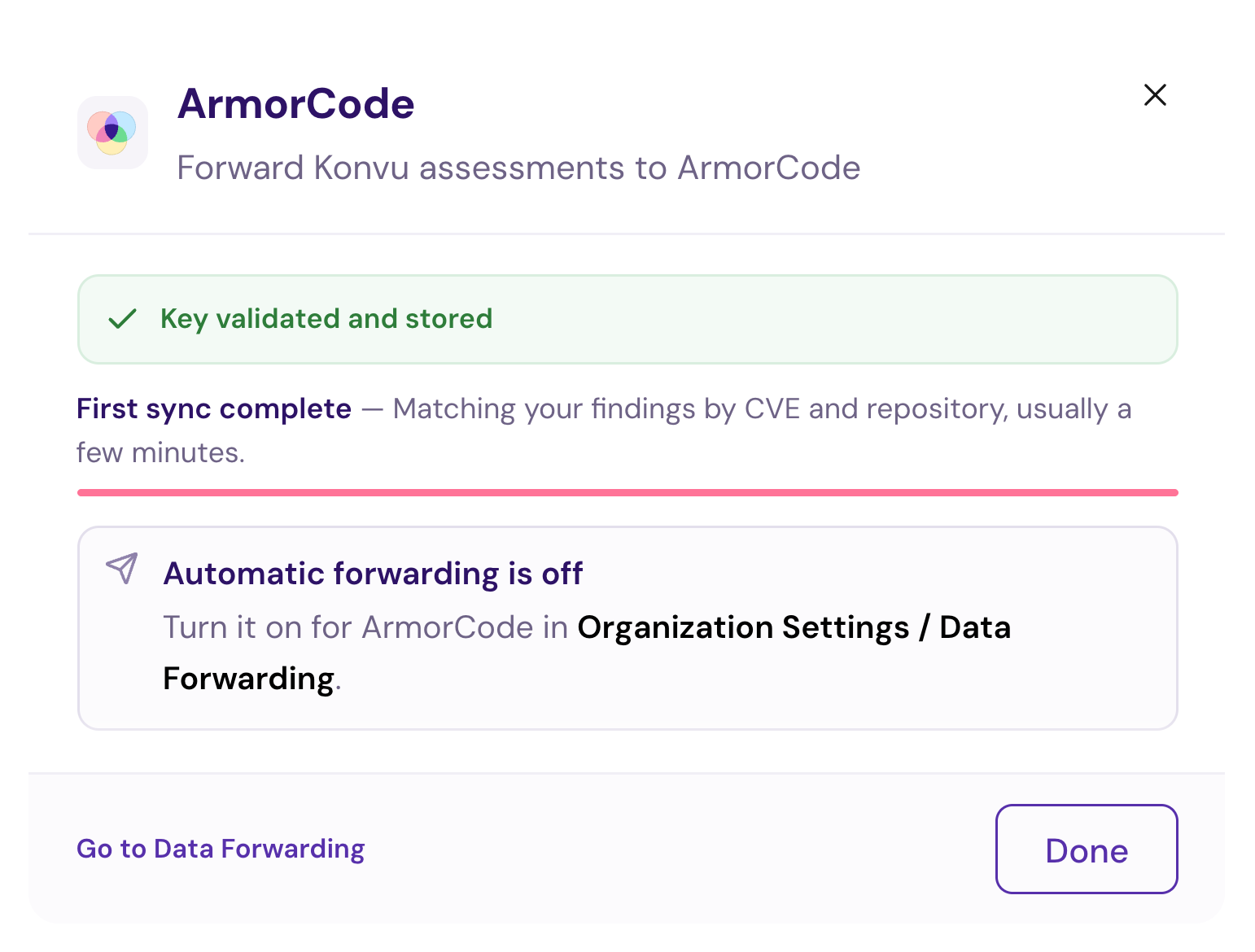
The connection dialog reports **First sync complete** when the import succeeds. If it reports **First sync failed** or **First sync unavailable**, contact Konvu to inspect or retry the import. ArmorCode's integration detail page does not currently expose the standard manual synchronization controls.

<figure><img src="https://4216786002-files.gitbook.io/~/files/v0/b/gitbook-x-prod.appspot.com/o/spaces%2Fd2uS6kuROSFKDrT5HC1U%2Fuploads%2Fgit-blob-0f873b714bd3d836f9788af4959f03579cd94143%2FArmorCode%20connection.png?alt=media" alt="ArmorCode connection dialog showing the first sync complete and automatic assessment delivery switched off" width="490"><figcaption><p>A completed first sync confirms the import succeeded. Automatic delivery remains off until you enable it.</p></figcaption></figure>

After the import, open **Triage** to review your SCA findings. Imported findings need to map to connected source code before Konvu can assess them. A successful sync does not mean every finding in ArmorCode was eligible for import or has already received an assessment.

<figure><img src="https://4216786002-files.gitbook.io/~/files/v0/b/gitbook-x-prod.appspot.com/o/spaces%2Fd2uS6kuROSFKDrT5HC1U%2Fuploads%2Fgit-blob-b93ae96071035db6492c7729774456455e33ceb9%2FArmorCode%20integration%20status.png?alt=media" alt="Integrations list showing ArmorCode installed with one configuration"><figcaption><p>The Integrations list shows ArmorCode as installed with one configuration. Open it to check the latest synchronization status.</p></figcaption></figure>

## Send assessments back to ArmorCode

Choose how to send results:

* **Send one SCA assessment** from its finding page in Triage. Review the comment and tag before sending. This works with automatic forwarding off and does not change your organization settings.
* **Automatically forward SCA and SAST assessments** by enabling ArmorCode in **Organization Settings > Data Forwarding**. Turn the switch off to pause automatic delivery. See [Configure data forwarding](#configure-data-forwarding).

Konvu updates matching existing ArmorCode findings; it does not create new ArmorCode findings. For SCA, it uses the imported ArmorCode finding IDs associated with the assessed vulnerability and manifest. It can also match Dependabot findings through their GitHub alert identifiers when a direct ArmorCode match is unavailable.

Each delivery adds an assessment comment and sets a `konvu.assessment_result` tag:

| Konvu assessment | ArmorCode tag                            |
| ---------------- | ---------------------------------------- |
| Exploitable      | `konvu.assessment_result:exploitable`    |
| False Positive   | `konvu.assessment_result:false_positive` |
| Unknown          | `konvu.assessment_result:unknown`        |

Konvu does not change the finding's native ArmorCode status or severity. A false-positive assessment is recorded as a comment and tag; it does not close the finding in ArmorCode.

Updated assessments can add new comments. Delivery retries check for an existing comment for that assessment to avoid posting the same one again. If a previously published assessment is retracted, Konvu adds a retraction comment and sets the assessment-result tag to `unknown`.

## Send a single assessment

1. Open an **SCA finding** in **Triage** with a completed assessment.
2. Click **Send to ArmorCode** in the finding header. The button appears when your organization has an ArmorCode connection.
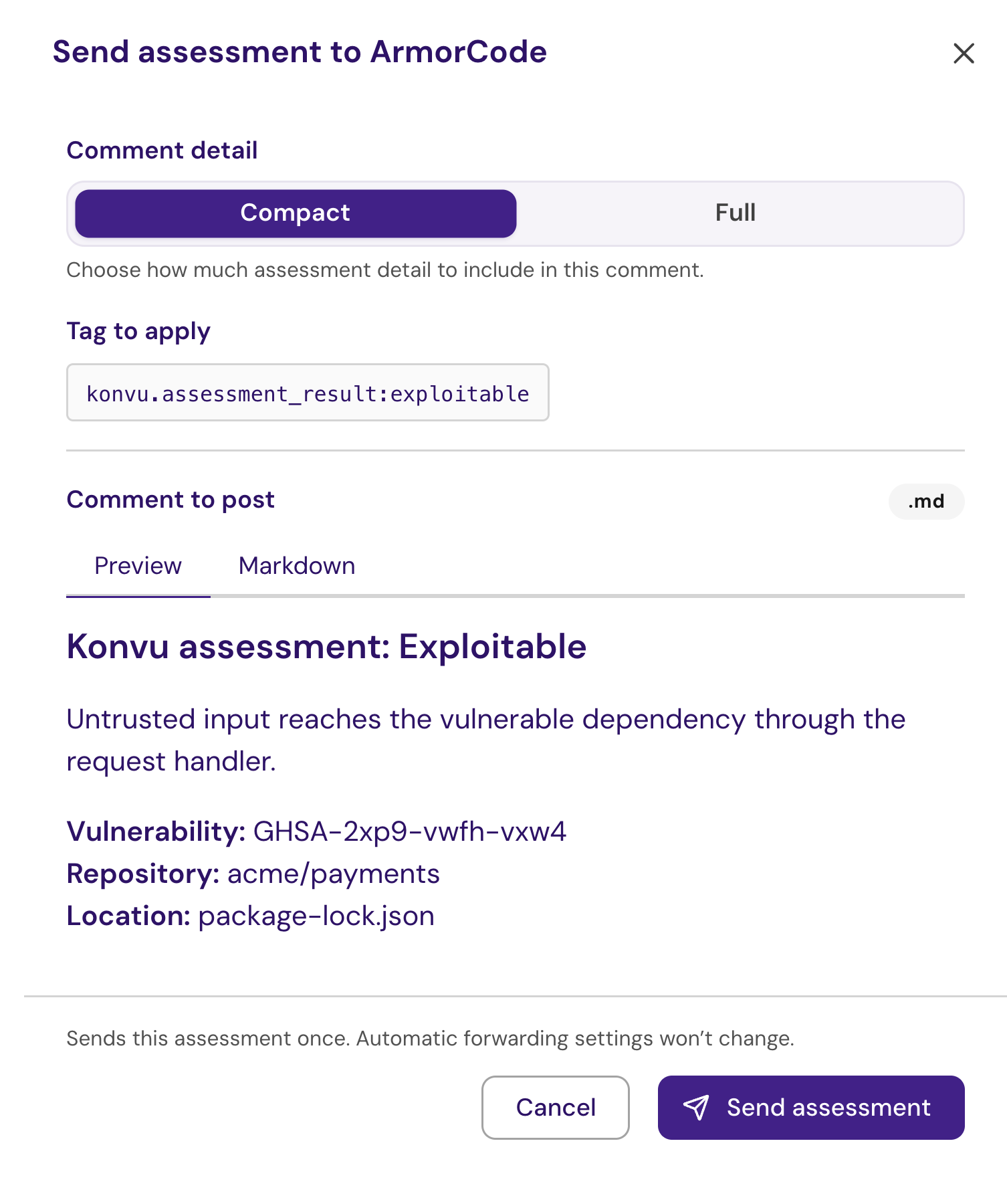
3. In **Send assessment to ArmorCode**, choose **Compact** or **Full** under **Comment detail**. Full includes the detailed assessment evidence. This choice applies to this delivery, not the organization's default format.
4. Review **Tag to apply** and **Comment to post**. Use **Preview** to read the formatted comment or **Markdown** to inspect its source.
5. Click **Send assessment**. The status changes from queued or sending to **Sent to ArmorCode** after delivery succeeds. Links to the matching ArmorCode findings appear when available.

<figure><img src="https://4216786002-files.gitbook.io/~/files/v0/b/gitbook-x-prod.appspot.com/o/spaces%2Fd2uS6kuROSFKDrT5HC1U%2Fuploads%2Fgit-blob-0de28025694a0e5e3cbc3f551a9827edbad6a7ab%2FArmorCode%20single%20assessment.png?alt=media" alt="Single-assessment send drawer showing Compact and Full options, the assessment-result tag, a comment preview, and the Send assessment button" width="490"><figcaption><p>Example SCA assessment preview. Review the exact comment and tag before sending once to ArmorCode.</p></figcaption></figure>

Sending once leaves automatic forwarding unchanged. You can use it while the ArmorCode switch on Data Forwarding is off. An assessment already delivered is shown as sent instead of being sent again. If delivery fails, reopen the drawer, review the status, and use **Retry**. A saved delivery keeps its original comment format for retries.

If sending is unavailable, check the reason in the drawer: a completed assessment and an eligible finding are required. Successful delivery also requires a matching finding in ArmorCode. If the assessment changes before you send, review the refreshed preview before trying again.

The single-send control currently appears on SCA finding pages. Use automatic forwarding for SAST assessments.

## Forward SAST assessments

Enable the same ArmorCode switch in **Data Forwarding** to send the latest completed SAST assessments as well as SCA assessments. Konvu adds an assessment comment and the same assessment-result tags described above. **Affected** maps to `exploitable`, **Not affected** to `false_positive`, and an **Inconclusive** completed assessment to `unknown`.

To match a SAST assessment, ArmorCode must already contain a **SAST** finding with the same scanner source, exact scanner finding ID (`toolId`), and repository URL. Konvu normalizes repository URLs before comparing them. It does not guess a match from the rule name or file location, and it does not create missing findings in ArmorCode.

If no exact match is found, **Delivery activity** shows a failed delivery explaining that the scanner ID, source, and repository did not match. Check that the same scanner findings reach both Konvu and ArmorCode, with consistent identifiers and repository metadata.

## Configure data forwarding

The **Data Forwarding** page brings together assessment forwarding settings and delivery activity. All signed-in users in **hosted organizations** can open the page, change forwarding settings, and inspect delivery activity. Your ArmorCode connection appears there automatically after you connect it in **Integrations**.

| Page                                         | What you use it for                                                                                       |
| -------------------------------------------- | --------------------------------------------------------------------------------------------------------- |
| **Integrations > ArmorCode**                 | Connect ArmorCode, manage credentials, and check the import status.                                       |
| **Organization Settings > Data Forwarding**  | Control automatic SCA and SAST forwarding, choose the default comment detail, and check delivery results. |
| **Triage > SCA finding > Send to ArmorCode** | Preview and send one completed assessment without changing automatic forwarding.                          |

### Choose what gets forwarded

1. Open your organization menu and select **Data Forwarding**.
2. Find the **ArmorCode** row. If it is not connected, click **Connect in Integrations →** to complete the integration setup.
3. Use the switch on the right of the ArmorCode row to control automatic forwarding. When enabled, Konvu sends eligible completed SCA and SAST assessments to matching ArmorCode findings. When disabled, automatic delivery is paused; individual SCA sends remain available. The connection stays in place and existing ArmorCode comments and tags are retained.
4. Choose **Compact** or **Detailed** beside the switch. Each change is saved immediately; there is no separate Save button.

<figure><img src="https://4216786002-files.gitbook.io/~/files/v0/b/gitbook-x-prod.appspot.com/o/spaces%2Fd2uS6kuROSFKDrT5HC1U%2Fuploads%2Fgit-blob-8d1a178e3dab4b3876b655d1301f2cff2842e2ba%2FArmorCode%20data%20forwarding.png?alt=media" alt="ArmorCode row on the Data Forwarding page with automatic forwarding off and Compact assessment comments selected"><figcaption><p>The ArmorCode row controls automatic forwarding for both SCA and SAST assessments.</p></figcaption></figure>

**Compact** is the default: it summarizes the assessment result and its evidence. **Detailed** includes available investigation steps and supporting code evidence, which can include file paths and code snippets. The format controls the assessment comment; both formats use the same assessment-result tag. Changing the format does not edit comments already posted in ArmorCode.

The separate **Notifications** page controls weekly email and Slack alerts. Those switches do not enable ArmorCode forwarding. Likewise, enabling ArmorCode does not enable forwarding to Wiz or change your notification settings.

{% hint style="info" %}
Data Forwarding is available to all signed-in users in hosted organizations; no admin or superuser access is required. It is not available for on-premises organizations.
{% endhint %}

### Check delivery activity

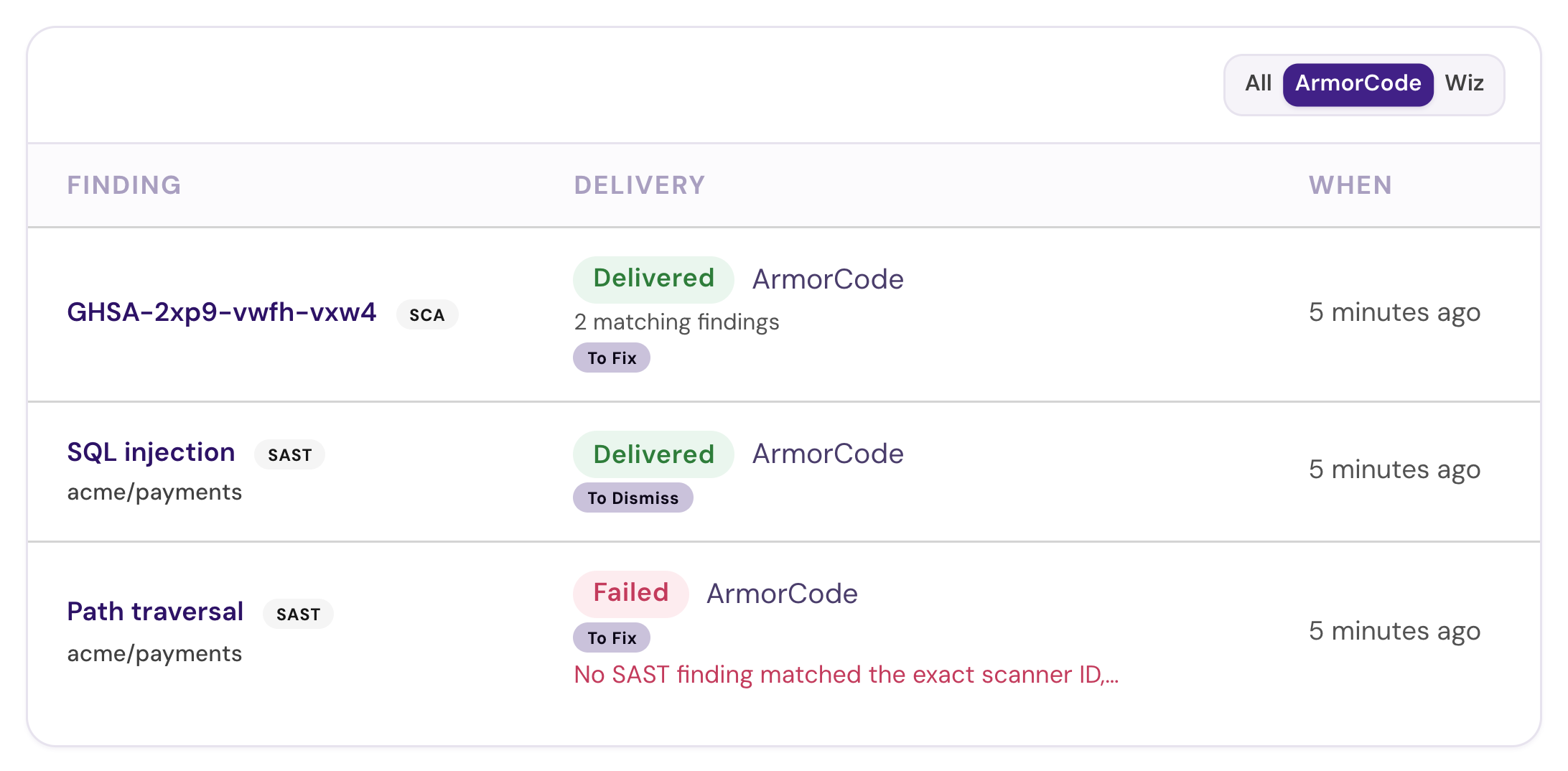
Scroll to **Delivery activity** and select the **ArmorCode** filter. This shows outgoing SCA and SAST deliveries, including individual sends, independently of the incoming synchronization status on the integration page. A successful import confirms that Konvu read findings; it does not confirm that an assessment was sent back.

<figure><img src="https://4216786002-files.gitbook.io/~/files/v0/b/gitbook-x-prod.appspot.com/o/spaces%2Fd2uS6kuROSFKDrT5HC1U%2Fuploads%2Fgit-blob-6641520ab4cc21fd579eeebad385258fb505dd8f%2FArmorCode%20delivery%20activity.png?alt=media" alt="Delivery activity showing SCA and SAST ArmorCode assessments, including a failed scanner-identity match"><figcaption><p>Example SCA and SAST deliveries filtered to ArmorCode, including a failed SAST match. Historical entries remain visible while automatic forwarding is paused.</p></figcaption></figure>

| Delivery status | Meaning                                                                                                                               |
| --------------- | ------------------------------------------------------------------------------------------------------------------------------------- |
| **Queued**      | The assessment is waiting to be sent.                                                                                                 |
| **Sending**     | A delivery attempt is in progress.                                                                                                    |
| **Retrying**    | An attempt failed and Konvu will try again, up to three attempts in total.                                                            |
| **Delivered**   | The delivery completed successfully.                                                                                                  |
| **Failed**      | The delivery failed and needs attention. Check the error shown, when available, and verify the API key's comment and tag permissions. |
| **Superseded**  | A newer assessment revision has replaced this delivery.                                                                               |

Each row shows the finding, delivery status, and time. When available, the finding title links to Konvu and the delivery label links to the matching ArmorCode finding. A matching-findings count indicates that one assessment applies to multiple ArmorCode findings. The badge shows the assessment result, or the delivery action when an assessment result is unavailable: **Upsert** publishes an assessment; **Retract** withdraws a previously published assessment.

If the feed is empty, check that you have sent an individual assessment or enabled automatic forwarding, and that an eligible completed assessment has a matching ArmorCode finding. If a delivery fails, use its finding and timestamp when contacting Konvu for help.

## Troubleshooting

| Problem                                   | What to check                                                                                                                                                                                                                         |
| ----------------------------------------- | ------------------------------------------------------------------------------------------------------------------------------------------------------------------------------------------------------------------------------------- |
| API key rejected                          | Confirm the key is active and has findings read access.                                                                                                                                                                               |
| Could not reach ArmorCode                 | Retry when the ArmorCode API is available. This error does not necessarily mean the key is invalid.                                                                                                                                   |
| ArmorCode is already connected            | Open the existing connection. Only one ArmorCode integration is supported per Konvu organization.                                                                                                                                     |
| Sync succeeds, but findings are missing   | Confirm the findings are categorized as SCA vulnerabilities and contain the required repository, package, version, vulnerability, and manifest metadata.                                                                              |
| Findings appear without assessments       | Verify that their repositories are connected to Konvu and source code analysis has completed. See [How Assessments Work](/konvu/triage-and-remediation/exploitability-assessment/how-assessments-work.md).                            |
| Assessments do not appear in ArmorCode    | Check **Data Forwarding → Delivery activity → ArmorCode**. Confirm you sent the assessment individually or enabled automatic forwarding, that a matching ArmorCode finding exists, and that the key can add comments and update tags. |
| Send assessment is unavailable            | Read the reason in the preview drawer. Wait for a completed SCA assessment and confirm that an eligible finding is available.                                                                                                         |
| SAST delivery reports no matching finding | Compare the exact scanner finding ID, scanner source, SAST scan type, and repository URL in both systems. Matching by rule or file location is not supported.                                                                         |

## Next steps

Review [how assessments work](/konvu/triage-and-remediation/exploitability-assessment/how-assessments-work.md) and [read the assessment details](/konvu/triage-and-remediation/exploitability-assessment/reading-an-assessment.md) to understand the assessments sent to ArmorCode.


---

# Agent Instructions
This documentation is published with GitBook. GitBook is the documentation platform designed so that both humans and AI agents can read, navigate, and reason over technical content effectively. Learn more at gitbook.com.

## Querying This Documentation
If you need additional information that is not directly available in this page, you can query the documentation by asking a question.

Perform an HTTP GET request on the following URL with the `ask` and `goal` query parameters:

```
GET https://docs.konvu.com/konvu/get-started/bring-in-findings/armorcode.md?ask=<question>&goal=<user_goal>
```

`ask` is the immediate question: it should be specific, self-contained, and written in natural language.
`goal` is what the user is ultimately trying to achieve, the reason they need the answer. Sharing it helps GitBook give you a better, more relevant answer. A goal is most helpful when it describes the outcome the user wants rather than restating the question. For example, with `ask=how do I create an API token`, a goal like `automate deployments from our CI pipeline` lets GitBook tailor the answer to that use case.

The response will contain a direct answer to the question and relevant excerpts and sources from the documentation.

Use this mechanism when the answer is not explicitly present in the current page, you need clarification or additional context, or you want to retrieve related documentation sections.